
Lead conversion tracking is often more complex than tracking for standard e-commerce stores and, as a result, is more often implemented incompletely, with critical elements for marketing measurement and optimization left out.
Closing the gap between Google Analytics, advertising platforms such as Google and Meta, and your business data is especially important for lead-generation businesses.
This article covers the four key components of a more complete lead conversion tracking setup: capturing source data, tracking lead form submissions, sending lead status updates to analytics and advertising platforms, and connecting lead data with business outcomes for internal attribution and analysis.
The overall data flow should look like this:
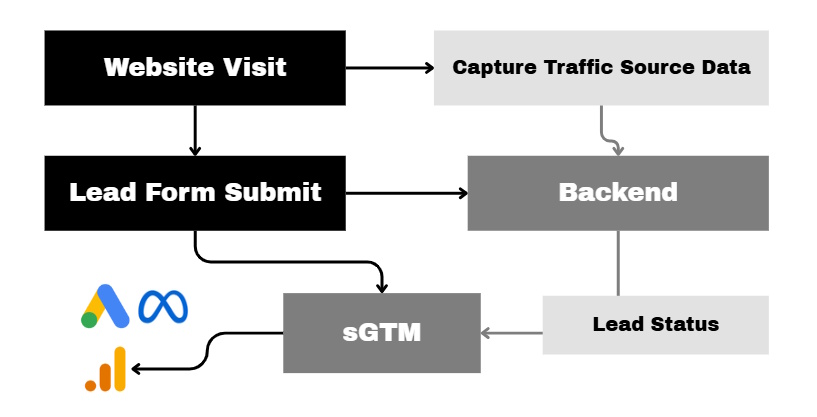
For lead conversion tracking, whether for B2B or B2C, I strongly recommend implementing the following steps:
- Capture traffic source data and connect it to the lead
- Implement dataLayer events for lead forms with key data
- Send lead status updates to Google Analytics and advertising platforms
- Connect lead source data with business outcomes for internal attribution and analysis
Capture traffic source data and connect it to the lead
The first step is to capture the visitor’s traffic source and platform identifiers and connect them to the lead when the form is submitted.
The basic data flow should look like this:
- Capture attribution data when the visitor arrives on the website.
- Store it temporarily in cookies, local storage, or your backend.
- Attach it to the lead when the form is submitted.
- Save it with the lead record in your CRM or database.
Here is the data you may want to collect and save with each lead form submission:
- Traffic source data using UTM parameters and
document.referrer. At a minimum, capture the first and/or last non-direct source. - Click IDs for advertising platforms, such as
gclidfor Google Ads,fbclidfor Meta—or, preferably, the_fbcand_fbpcookies—and equivalent identifiers for other platforms. - Consent status.
- GA4 client and session IDs if you plan to send events to GA4 through the Measurement Protocol or Data Manager API.
Store the user’s consent status together with the lead so that later conversion is triggered only if the user granted analytics and marketing tracking consent. With consent data, you could also compare the data across platforms better and monitor your tracking coverage.
One technical detail to keep in mind: if you have a server-side GTM setup for GA4 with server-managed cookie settings, the GA4 client ID will be stored in an FPID cookie. This cookie is accessible only to the web server, meaning browser JavaScript cannot read or write it directly. You would therefore need to create a custom cookie.
With some third-party platforms, you can add hidden fields or use URL parameters to pass these additional values. The exact implementation depends on the platform you are using.
The objective of this step is to ensure that each lead record contains the source and identifier data required for later conversion matching and attribution.
Implement dataLayer events for lead forms with key data
Having dataLayer events for form submissions, as well as individual form steps when a form contains multiple steps, allows you to trigger marketing tracking through Google Tag Manager and include the data required for each event.
At a minimum, you should pass user data: at least one, but preferably both, of the following:
- Email address
- Phone number
This enables better conversion matching for the original lead, as well as more accurate attribution of later lead status updates within advertising platforms.
User data can also be hashed with SHA-256 for additional privacy. If it is not hashed before being passed to the platform, most advertising platforms will hash it before sending it to their servers.
A unique lead ID is also important. It acts as the equivalent of the transaction_id used in e-commerce and can help ensure event deduplication, event retraction, or adjustments.
More importantly, a unique lead ID allows you to connect the original form submission with later events such as lead qualification, proposal creation, a completed sale, or rejection. It also lets you associate status updates with a specific lead rather than relying on an email address or phone number.
This is especially useful when the same user may submit multiple forms.
If your lead form contains data that can be used for conversion segmentation and analysis, be sure to include it in the dataLayer as well. Examples may include:
- Form or service type
- Company size
- Customer intention
- Customer type, such as a private individual or a company
All key data should be included in the final dataLayer event for a successful form submission.
Other events, such as those for individual lead form steps, can also be added when relevant. These events should contain the data available at that point in the form process.
Example dataLayer event for a lead form submission:
window.dataLayer = window.dataLayer || [];

window.dataLayer.push({
  event: "lead_form_submit",
  lead_id: "123456",
  lead_type: "company",
  company_size: "50-100",
  user_data: {
    email: "user@email.com",
    phone_number: "+37111111111"
  }
});
Tracking forms embedded through iframes
The approach above applies to forms integrated directly into the website code.
If a form is embedded through an iframe and it is possible to add custom JavaScript inside that iframe, you can send a message from the iframe to the parent page containing the required data. The parent page’s GTM setup can then use that data to trigger the relevant marketing tags.
Some third-party platforms provide ways to access form data and form status. To name a few popular examples, Calendly, HubSpot, and Gravity Forms can use GTM listeners to trigger dataLayer events for form interactions. The exact data available depends on the platform.
If the third-party platform does not allow tracking code to be added and provides no way to trigger dataLayer events, you will need to fall back on whatever tracking is technically possible.
In many cases, this means tracking a redirect to a thank-you page after a form has been submitted through the iframe. This approach often provides less data, but you will either need to accept those limitations or change how the lead form is integrated into the website.
Send lead status updates to Google Analytics and advertising platforms
Tracking only the initial lead does not tell advertising platforms which leads eventually became qualified opportunities or customers.
Sending later lead status updates provides stronger optimization signals and allows campaigns to optimize toward business outcomes rather than form submissions alone. This is especially valuable when higher-quality conversion events occur in sufficient volume.
To send conversions from your backend to Google, Meta, and other platforms, you can:
- Use APIs to send requests directly.
- Use third-party integration platforms such as Zapier.
- Send a request to your server-side GTM (sGTM) environment, if you have one, and then send the appropriate marketing requests from there to the advertising platforms.
I generally recommend the sGTM approach because it provides greater flexibility, better data governance, and requires fewer internal or external development resources for building and maintaining individual API integrations.
It is also important to consider the maximum conversion window within which advertising and analytics platforms allow data to be imported:
- GA4 Measurement Protocol: up to 72 hours of backdating
- Google Ads: up to 90 days after the click
- Meta Ads: up to 7 days
If a lead status is assigned quickly—within a few minutes or, more generally, within 72 hours—you may be able to import the conversion into GA4, Google Ads, Meta Ads, and other platforms.
However, if your business has a longer lead-processing cycle of more than three days, several weeks, or even months, you will face some limitations.
In that case, I recommend identifying the best possible lead-quality signal that becomes available within each platform’s maximum conversion window. For example, this could be a qualified lead, booked consultation, accepted application, or another status that indicates higher lead quality.
The goal is to provide advertising platforms with a conversion signal that is more valuable than the original form submission while still being available within the platform’s conversion window.
Connect lead source data with business outcomes for internal attribution and analysis
Sending conversion updates to advertising platforms supports campaign optimization, but it does not replace internal attribution and business reporting.
You should connect the source data saved with the original lead to later lead statuses and business outcomes in your CRM, database, or reporting environment. These outcomes may include qualified leads, opportunities, proposals, completed sales, revenue, and customer lifetime value.
This internal data can support:
- Cross-channel attribution and performance analysis
- Longer lead-processing and sales cycles
- Revenue and customer lifetime value analysis
- Reporting based on qualified leads, opportunities, and completed sales
- Comparison of campaign performance across advertising platforms
The conversion numbers in your CRM, analytics tools, and advertising platforms will not necessarily match. Each system may use different attribution models, conversion windows, matching methods, and reporting logic.
This is why you should not rely entirely on Google and Meta but should also maintain conversion source and outcome data in your own systems.
Although attribution results will differ between systems, connecting lead source data with actual business outcomes will give you a much better understanding of channel and campaign performance.
Additional recommendations
It is also important to:
- Use structured campaign naming conventions and maintain good UTM coverage.
- Add self-reported attribution by asking customers how they first heard about your business. This can provide valuable context that tracking tools may not capture, especially for word-of-mouth, offline, and multi-touch customer journeys.
- Ensure that your overall tracking setup is reliable. A server-side GTM setup with a first-party tracking domain can improve data quality and coverage.
- Maintain tracking and data documentation that describes the current tracking approach, known limitations, and existing issues.
- Connect backend, media, and web analytics data in interactive dashboards.
Conclusion
A complete lead conversion tracking setup should connect the original website session, the submitted lead, and the eventual business outcome.
Advertising platforms can then optimize using better conversion signals, while your CRM, database, or reporting environment remains the primary source for long-term attribution, cross-channel reporting, and performance analysis.